| Article #: GEN1002CE | Product:Flare Online |
At MadCap Software, Security is a top priority. As a result, MadCap Software will no longer support the use of the SSH protocol in Flare when connecting to MadCap Flare Online. If you are currently using the SSH protocol, please convert to using the HTTPS protocol as soon as possible.
How to Determine Which Protocol Your Project is Using
-
In Flare, open your project and log on to MadCap Flare Online.
-
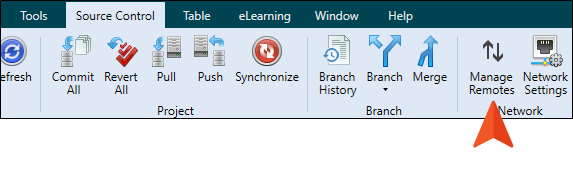
In the Source Control ribbon, click Manage Remotes.
-
If the repository starts with “git@git.madcapcentral.com”, it is using the SSH Protocol. Follow the directions below to switch to the HTTPS protocol.
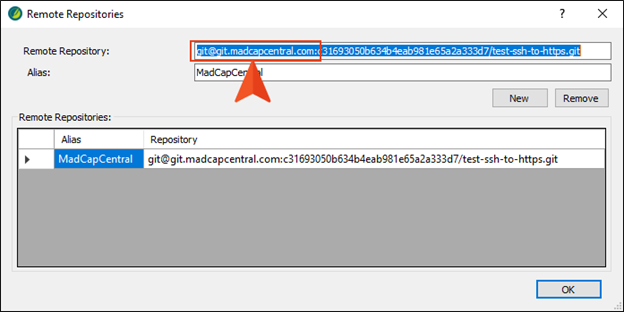
Note: NOTE: If your project was originally uploaded to MadCap Flare Online using the SSH protocol and you attempt to push or pull when SSH is disabled, you will receive the following message in Flare:
[error message - ssh: connect to host gitstage.madcapcentral.com port 22: Connection timed out fatal: Could not read from remote repository. Please make sure you have the correct access rights and the repository exists.]
How to Switch from the SSH to the HTTPS Protocol
-
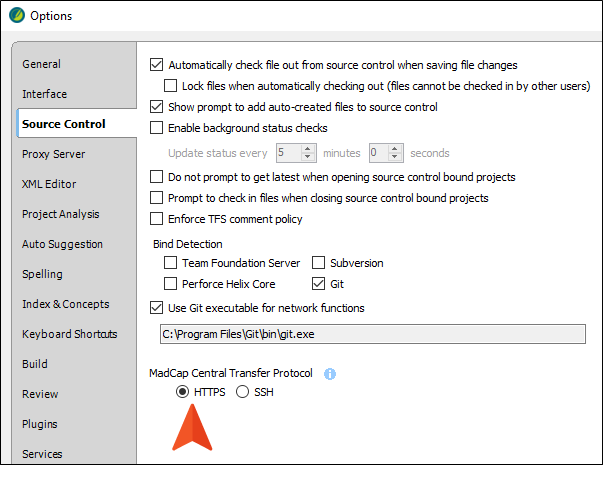
In Flare, select File > Options.
-
Select the Source Control tab.
-
Switch the option MadCap Flare Online Transfer Protocol from SSH to HTTPS, and click OK.
-
Open a project that has already been bound to Flare Online in the past using SSH.
-
In the Source Control ribbon, click Manage Remotes.
-
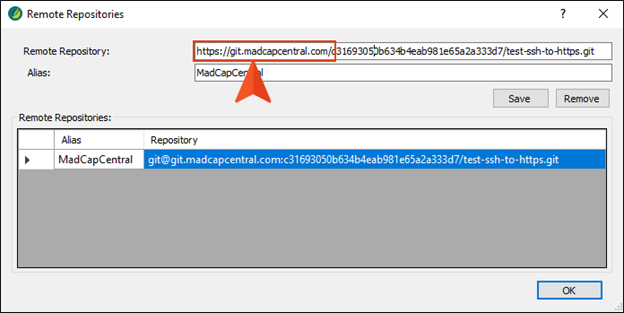
In the Remote Repository field at the top, change git@ to https:// and replace the colon after .com to a forward slash. (Your projects will have different identifiers than the following examples.)
EXAMPLE OF OLD URL: git@git.madcapcentral.com:[...Identifier…]/test-ssh-to-https.git
EXAMPLE OF NEW URL: https://git.madcapcentral.com/[...Identifier…]/test-ssh-to-https.git
-
Click Save.
-
Click OK.
-
If the Source Control ribbon disappears, close and reopen the project and it will reappear.
Attribution:
|
Last updated: January 14, 2026 |
Author: Paul Stoecklein |
Contributions by: MadCap QA John Castaneda |